

Tyre Jobsheet Software for Every Fitting Job
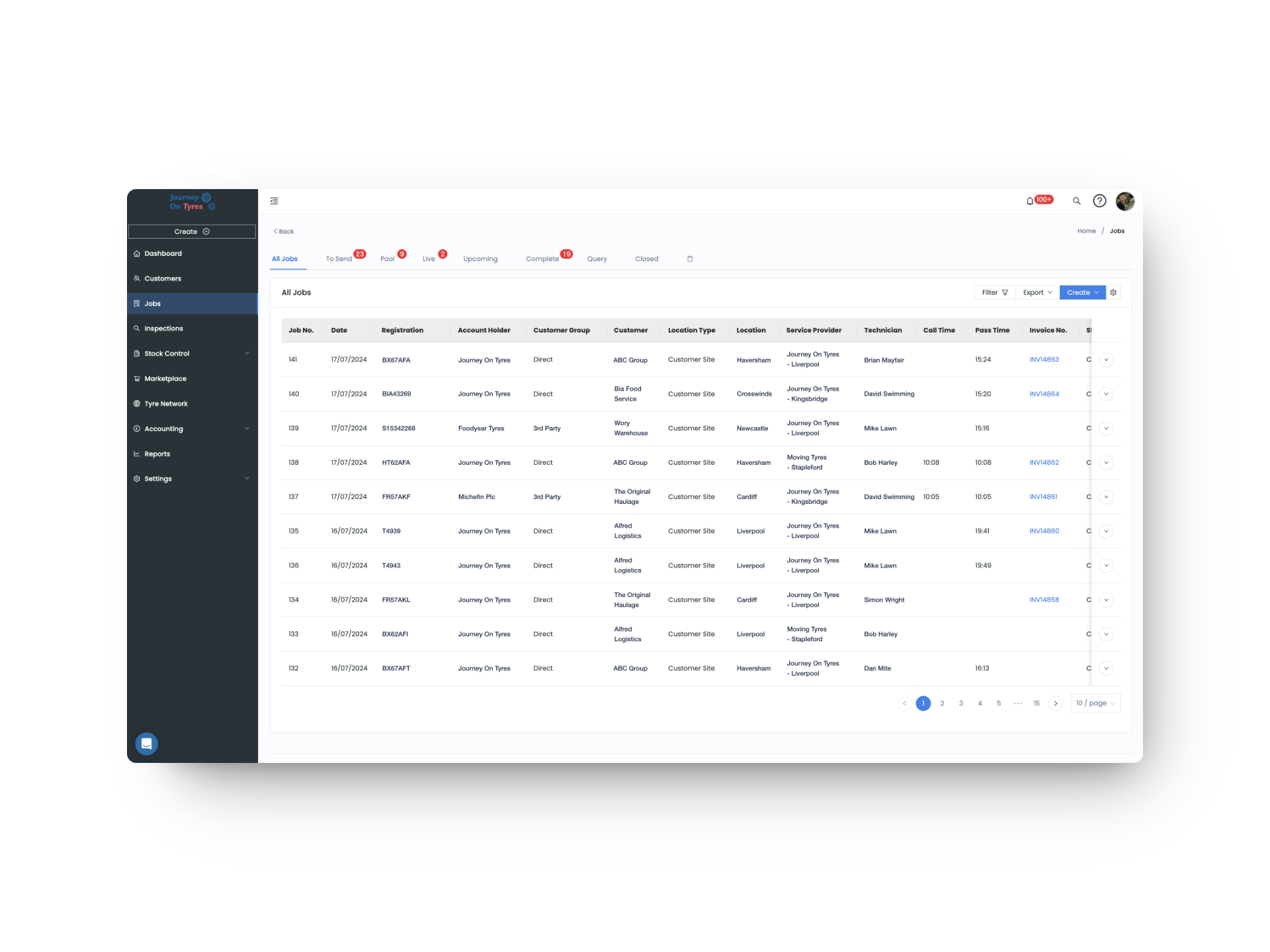
Ditch the paper. TyreOps tyre jobsheet software lets you create, assign and track every tyre job digitally. Your technicians get digital job sheets on mobile, your office gets real-time updates.
No setup fees · Cancel anytime
Trusted by leading tyre businesses across the world





Tyre Jobsheet Software That Covers the Whole Job
From two job types to live stock, vehicle history and customer logins, our tyre jobsheet software makes every job faster, with less admin.
Two Job Types, Built for Speed
Full vehicle jobs with complete tyre fitting detail, or a fast single-page Supply Only job for supplied items, loose wheel work and casing collections.
Checked, Edited, Then Sent
Review and edit any job sheet before it reaches your customer. Once you're happy, the job sheet and invoice send automatically.
One Search Box for Every Tyre, Wheel, Tube & Flap
One search box covers 210,000+ tyres, plus wheel, tube and flap databases, with partial search and results filtered to the vehicle's exact size.
Stock Moves With Every Job
Fitting a tyre pulls it from live stock instantly. Removing one routes it straight into COP, casing management, or retreading, with no extra admin.
Vehicle History, Ready Before You Start
Past jobs and inspections pre-fill tyre size, tread depth, axle configuration and more, so technicians tweak details instead of retyping them.
Customer Logins, Built for Self-Service
Customers log in to see their own jobs, inspections and invoices, schedule new jobs themselves, and access reports on performance, expenditure and gaps.
How Tyre Jobsheet Software Works in 3 Steps
01 | Create the Job
Enter the vehicle registration and TyreOps auto-populates customer details, vehicle data and service history. Select the tyres and services needed, and your digital job sheet is ready in seconds.
02 | Assign a Technician
Pick the right fitter based on availability and skill set. They receive an instant mobile notification with full job details, tyre specs and any customer notes.
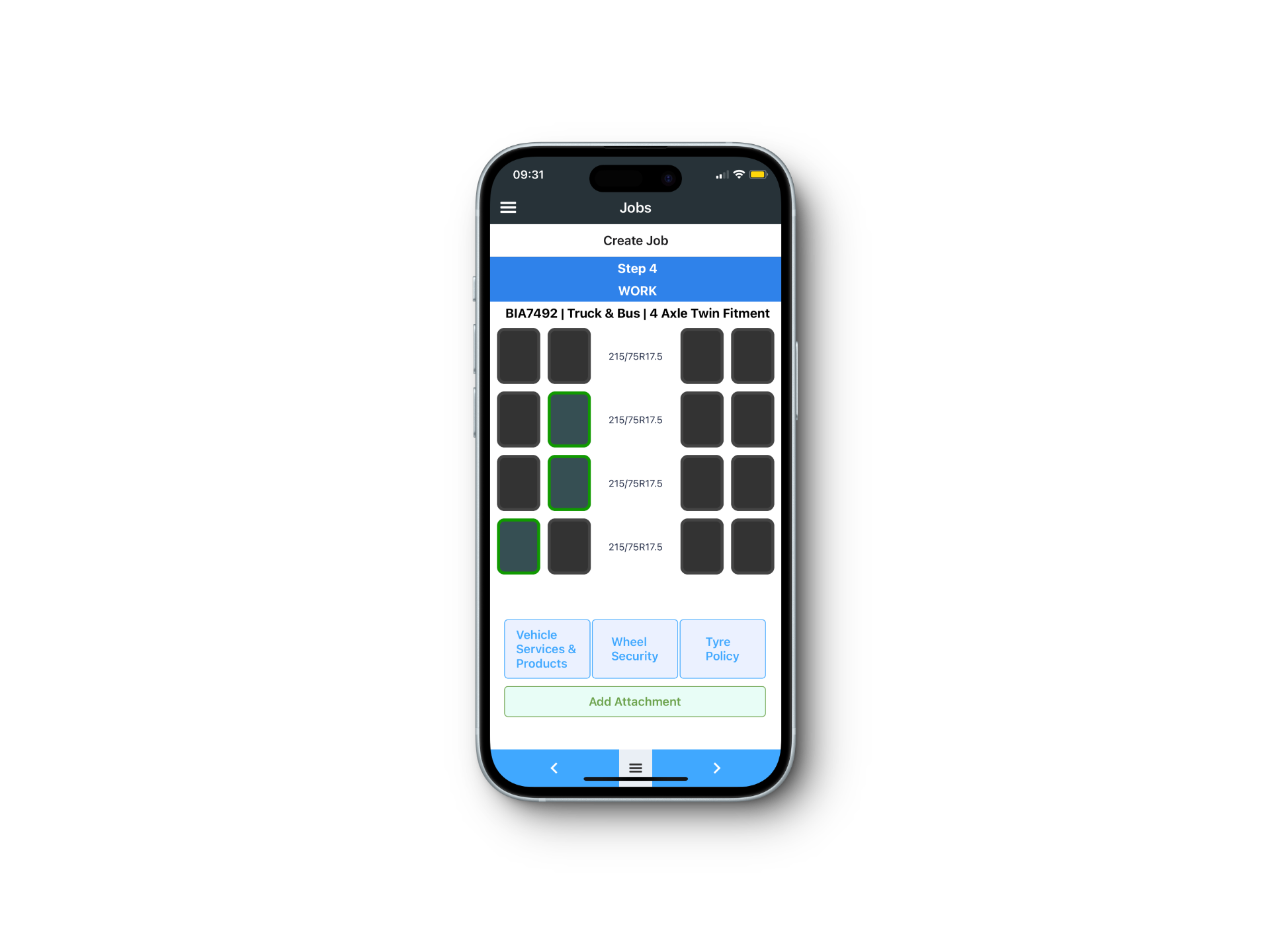
03 | Complete and Invoice
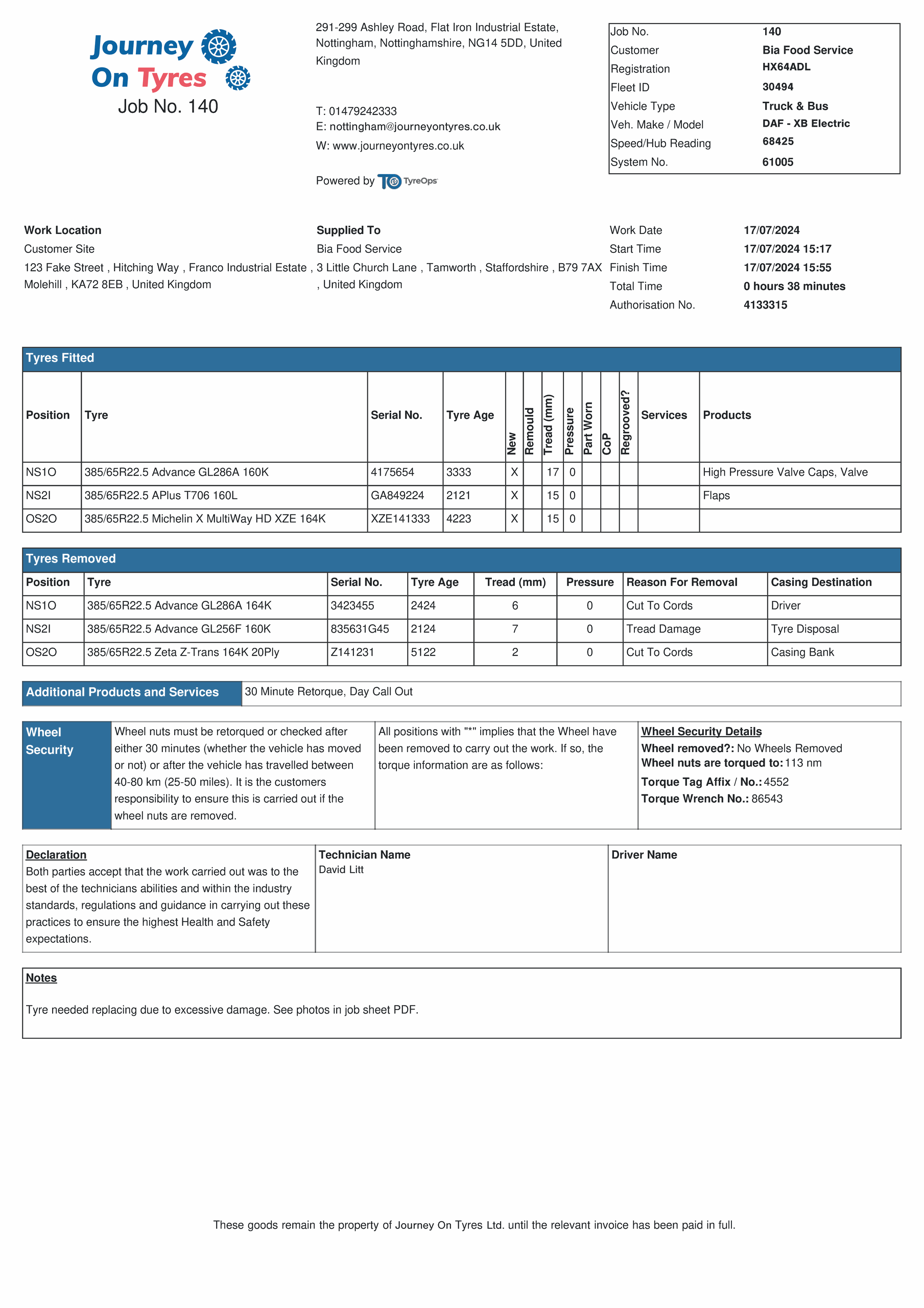
Your technician captures a digital signature on completion, and TyreOps automatically generates and sends the invoice. No paperwork, no chasing, just a clean, professional finish.
What Tyre Jobsheet Software Means for Your Business
Faster Jobs, Less Admin
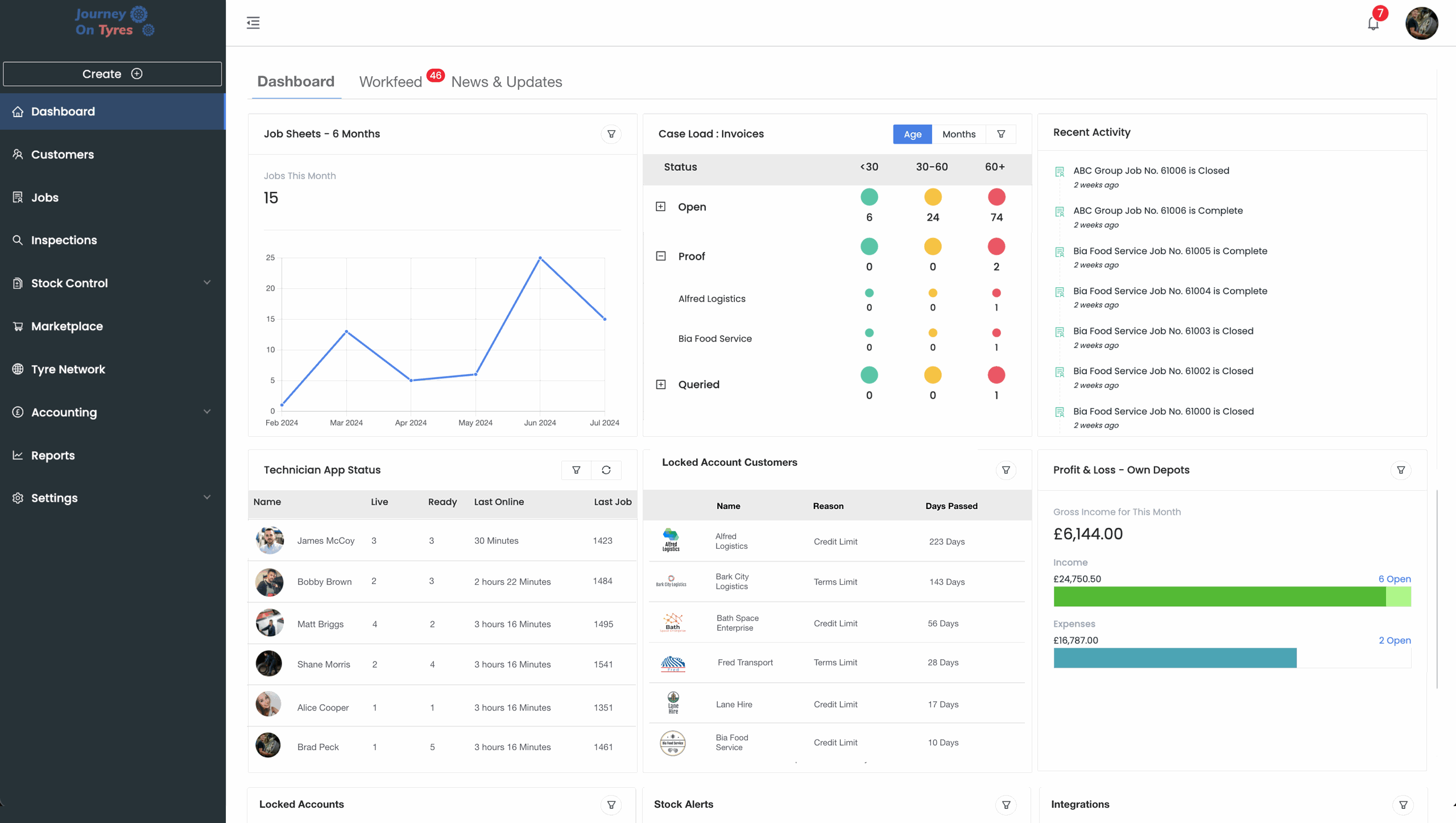
With tyre jobsheet software, vehicle history and live stock are ready before a technician starts, cutting admin by 53% per job so more time goes into the work itself.
Full Accountability
Tyre jobsheet software means every job is checked, edited if needed, and proven with photos and signatures before a customer ever sees it.
Zero Double Entry
Job data flows straight into invoices, your accounting software, and even your manufacturer's own systems, automatically.
Tyre Jobsheet Software That Finds, Fits and Finishes
Find Any Tyre From the Digital Job Sheet
With tyre jobsheet software there's no hunting through five separate fields for size, make, pattern, load and speed. Search once, across 210,000+ tyres plus wheels, tubes and flaps, filtered automatically to the vehicle in front of you.
- Partial search, e.g. “HT3” or “MICH” surfaces every match
- Results auto-filtered to the vehicle's exact tyre size
- Most-used tyres rise to the top of your results
Digital Job Sheets That Update Stock and History
With digital job sheets, fitting a tyre pulls it from live stock the moment it's selected. Removing one routes it into COP, casing management or retreading, with vehicle history pre-filling the next job before a technician even arrives. On average, jobs move 3x faster than paper-based processes.
- Live stock deducted automatically the moment a tyre is fitted
- Removed tyres routed to COP, casing or retreading
- Vehicle history pre-fills tyre size, tread depth and axle data
- Inspection data from previous jobs carries over automatically
Check, Send and Sync Every Digital Job Sheet
Tyre jobsheet software lets you check, edit and back every job with photos before your customer sees it, something few other tyre platforms allow. Once closed, the invoice generates automatically and syncs to your accounting software or manufacturer's own systems, with a full digital audit trail.
- Review and edit job sheets before customer delivery
- Automatic invoice generation the moment a job closes
- Syncs to Xero, QuickBooks and Sage
- Direct API push to manufacturer or tyre management portals
Features That Work With Tyre Jobsheet Software
TyreOps modules are built to work together. Explore how other features work alongside your tyre jobsheet software.
Capture tyre inspections with photos and tread depths on mobile, then attach them straight to the job card.
Stock ControlReal-time stock levels across every location. Low stock alerts surface the moment a job uses your last set.
Reports & AnalyticsGo deeper with advanced reporting, custom dashboards and scheduled exports for accountants and stakeholders.
Browse All FeaturesSee everything TyreOps can do, from real-time dashboards to automated invoicing.
See TyreOps in Action
Book a personalised demo and see how TyreOps fits your tyre operations. 30 minutes. No obligation.
Trusted by leading UK tyre businesses



Tyre Jobsheet Software FAQs
What's the difference between a Vehicle Job and a Supply Only job?
Can I review digital job sheets before they reach my customer?
Does tyre jobsheet software show the full history of a vehicle?
Can tyre jobsheet software handle both retail and fleet jobs?
Can technicians use the tyre jobsheet software on their own phones?
Does the tyre jobsheet software connect to Xero, QuickBooks and Sage?
Can customers create or schedule their own jobs?
Can I take photos on a job?
Ready to Run Your Tyre Business on TyreOps?

100+ tyre businesses already use TyreOps